

AusDoc SOLUS eDM SPECIFICATIONS
Find out specs and dimensions specifically for our range of SOLUS eDMs we send to our highly engaged audience.
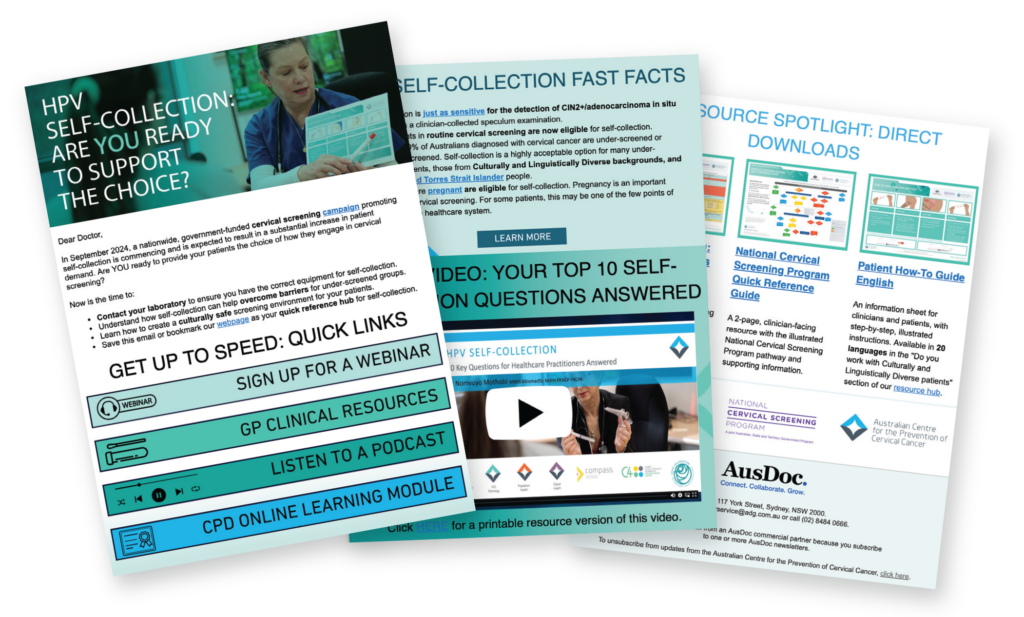
AusDoc manages the entire delivery process — reviewing, testing, and scheduling the client’s supplied HTML file
This document outlines the technical specifications required for submitting a Solus Email and provides best practice guidelines to help you brief designers, developers, or vendors effectively
Lead Time & Approval Process
Final HTML files, subject heading and preview text must be received 10 days prior to the booked send date.
A test email will be sent to your nominated test recipient list for approval prior to distribution.
File Requirements
- File Type: .html or .txt file of the HTML code (PDF or image only files are an incorrect format and cannot be accepted. Many email providers block images by default)
- Layout: Table based and mobile responsive
- Styles: Inline CSS styling needs to be included on HTML elements
- Width: Max 600 pixels
- Height: No pixel limit
- File size: ≤ 150 KB limit
- Content Types: Images and text only (no embedded forms, attachments, or videos always link externally)
Image Specifications
- Hosting: Externally hosted with absolute URLs
- Format: JPG / PNG / GIF
- Resolution: 72 DPI (web optimised)
- Width: Max 600 pixels (export 2×–3× for retina clarity)
- Alt text: Required for accessibility
- File size: ≤ 200 KB each (total images ≤ 1 MB)
- Linking: Reference images with https://
HTML Meta Inclusions
Doctype:
<!DOCTYPE html>
<html lang="en" xmlns="http://www.w3.org/1999/xhtml" xmlns:v="urn:schemas-microsoft-com:vml" xmlns:o="urn:schemas-microsoft-com:office:office">
Include the following metatags in the section of your HTML:
<meta charset="UTF-8">
<meta name="viewport" content="width=device-width, initial-scale=1.0">
<meta http-equiv="X-UA-Compatible" content="IE=edge">
<meta name="x-apple-disable-message-reformatting">
<!--[if gte mso 9]>
<xml>
<o:OfficeDocumentSettings>
<o:AllowPNG/>
<o:PixelsPerInch>96</o:PixelsPerInch>
</o:OfficeDocumentSettings>
</xml>
<![endif]-->
Header & Footer
Include the supplied AusDoc header and footer within your HTML file upon submission
Subject Heading & Preview Text
Subject Heading Length: Within 40–60 characters (approx. 6–9 words)
Preview Text Length: Within 35–90 characters (key message within first 70)
Tags & Links
- Type: Use Full / Absolute URL (do not use partial URL links)
- Tracking: You can use UTM tags attached to links (optional)
- Software: Link management software is not recommended as it may get flagged by email providers
- Testing: It is recommended to test your links prior to submission (especially if you have added UTM tags to the end of the URL)
Best Practice Recommendations
1. Layout & Structure
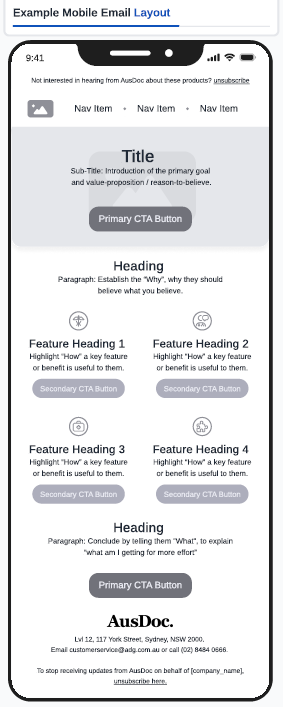
Keep it to 1-2 columns (totaling 600 pixels wide) as it scales best across Outlook, Gmail, and mobile clients
Lead with clarity: Place logo, headline, and/or hero image at the top for instant recognition
Prioritise the primary CTA: It should appear within the top 400 pixels and again near the end for scannability
Use whitespace intentionally: Improve scan flow and highlight key messaging without clutter
Avoid text heavy or stacked/overlaid images: They often break in Outlook and increase load time
Maintain sufficient text-to-background colour contrast: WCAG AA / AAA standard
Maintain ~60 % text / 40 % image ratio: Ideal for spam filter balance and prevents email provider image block
Avoid all-image emails: Many email clients block images by default, so if your email is made entirely of images, it may appear blank when opened
2. Content, Text & Readability
Front-load key information: Busy medical professionals skim; ensure the first 2 lines deliver the value
Use short paragraphs and bullet points: 1-2 sentences per block/section to maintain the viewers attention
Write in plain, factual English: Avoid marketing superlatives; focus on clarity and credibility
Subject line + preview text combo: Under 50 characters each, together should tell a clear story
Header text in images must also exist as live HTML text: Ensures accessibility and indexing
Minimum font sizes: 14 pixels body / 20 pixels headings for legibility and accessibility
3. Calls-to-Action (CTA’s)
Primary CTA button: Use a clear, action-focused verb (e.g. Register, Learn More, Download) and position the button in logical, high-visibility locations ideally near the top of the email. Include the CTA multiple times where it supports user decisionmaking and encourages conversion
Secondary CTA button: Position lower than a primary CTA in the email and/or style differently to indicate a supplementary, less critical action. This supports additional engagement without distracting from the primary goal
Minimum button size: 44 × 44 pixels (touch friendly)
Keep it focused: One primary goal per email improves clarity and click through performance. A clear, user centred value proposition with a balanced number of buttons enhances overall engagement and usability
AusDoc solus eDM’s – target your HCP audience with no distractions
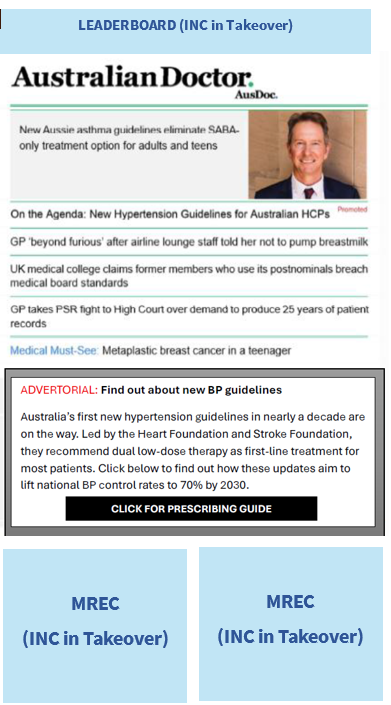
Australian Doctor Newsletter Advertorial
Requirements:
- Headline: 4-6 words
- Copy: 60-80 words
Option to include:
- Short references (if required)
- PI link
- PBS statement
- Link to own website (CTA = 3-4 words)
Please provide at least 10 working days before publication.
Reach Us
LOCATION
Level 12, 117 York Street,
Sydney NSW 2000
PO BOX
PO Box Q116
Queen Victoria Building
Sydney NSW 1230
CONTACTS
General Enquiries
Commercial Director
Natalie Ratcliffe
Partnerships Manager
Thomas Martinus